> For the complete documentation index, see [llms.txt](https://3dpaws.comet.ucar.edu/llms.txt). Markdown versions of documentation pages are available by appending `.md` to page URLs; this page is available as [Markdown](https://3dpaws.comet.ucar.edu/es/instrumentos.md).
# Instrumentos
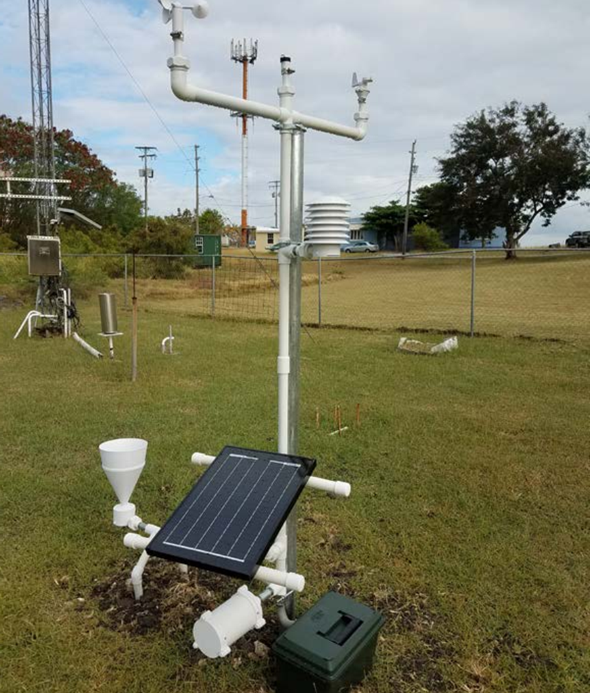
El sistema 3D-PAWS instalado en el Caribbean Institute for Meteorology and Hydrology de Barbados.
Esta foto muestra el diseño actual de 3D-PAWS. Esta configuración comprende un anemómetro de tres cazoletas, una veleta, un pluviómetro de cubeta basculante y sensores de temperatura, humedad relativa, radiación y presión. El sistema fue diseñado para poderse adaptar e instalar en distintas estructuras de soporte. Si bien el diseño actual emplea tubos PVC, que son de bajo costo y fáciles de obtener, es posible armar el soporte del sistema con tubos de aluminio o de otro metal, e incluso con tablas de madera.
El registrador de datos está instalado en un cilindro estanco montado en la estructura de soporte. El sistema 3D-PAWS se puede conectar a una fuente de energía industrial (el sistema requiere una tensión de entrada de 5 V) o a la batería de un sistema de energía solar. El tamaño de la batería y del panel fotovoltaico dependerá del lugar de instalación del sistema.
En las secciones siguientes encontrará las instrucciones pormenorizadas para armar los instrumentos 3D-PAWS. Para cada instrumento se incluyen listas de las piezas y las herramientas necesarias. Los archivos necesarios para imprimir las piezas en 3D se describen en la sección [Descarga de archivos](https://sites.google.com/ucar.edu/3dpaws-es/descarga-de-archivos).
---
# Agent Instructions
This documentation is published with GitBook. GitBook is the documentation platform designed so that both humans and AI agents can read, navigate, and reason over technical content effectively. Learn more at gitbook.com.
## Querying This Documentation
If you need additional information that is not directly available in this page, you can query the documentation by asking a question.
Perform an HTTP GET request on the following URL with the `ask` and `goal` query parameters:
```
GET https://3dpaws.comet.ucar.edu/es/instrumentos.md?ask=&goal=
```
`ask` is the immediate question: it should be specific, self-contained, and written in natural language.
`goal` is what the user is ultimately trying to achieve, the reason they need the answer. Sharing it helps GitBook give you a better, more relevant answer. A goal is most helpful when it describes the outcome the user wants rather than restating the question. For example, with `ask=how do I create an API token`, a goal like `automate deployments from our CI pipeline` lets GitBook tailor the answer to that use case.
The response will contain a direct answer to the question and relevant excerpts and sources from the documentation.
Use this mechanism when the answer is not explicitly present in the current page, you need clarification or additional context, or you want to retrieve related documentation sections.